
How to Create Viral Quizzes with a Quiz Maker
Discover how a great quiz maker can transform your marketing. Learn to build engaging quizzes that capture leads, segment audiences, and drive real results.
2025-12-13
Let's be honest, a good quiz maker isn't just for those "Which Disney Princess Are You?" time-wasters. It’s a seriously powerful tool for creating interactive experiences that grab people’s attention and actually get you results. Think of it as turning a one-sided questionnaire into a genuine two-way conversation with your audience.
Why a Quiz Maker Is Your Secret Marketing Weapon
Nobody enjoys filling out traditional, static forms. They feel like a trip to the dentist—necessary, but something you put off for as long as possible. A quiz, though? That’s an invitation to play. It's a chance to learn something new about yourself. This tiny shift in how it's perceived makes a world of difference for engagement.
This whole approach taps directly into basic human psychology. We're wired to be curious, especially about ourselves, and we love seeing where we fit in. A well-crafted quiz offers that little dopamine hit of self-discovery or a personalised recommendation, making it almost impossible to leave unfinished.
It's Not Just About Quizzes
When you boil it down, a quiz is really just a souped-up, specialised kind of form. In fact, a quiz is mostly the same type of interactive experience as user feedback forms, a pizza ordering form, or other custom surveys. This is why a versatile one-page form builder like Notie or other similar products can be used as a powerful quiz maker. This means the very same tool you use to create a "Which Marketing Persona Are You?" quiz can also handle so much more.
Let’s get practical. You could build:
- Customer Feedback: Ditch the boring survey and create a "Rate Your Recent Experience" quiz that uses logic to ask follow-up questions based on their answers.
- Pizza Ordering: How about a "Build Your Perfect Pizza" quiz? It walks customers through choosing crusts and toppings in a way that’s fun and feels less like a chore.
- New User Onboarding: A "Welcome Aboard!" quiz can introduce your product's key features and cleverly segment new customers by what they want to achieve.
This kind of flexibility is why it’s a must-have for anyone trying to gather information without sending their audience to sleep. The mechanics are the same—a series of questions leading to a specific outcome—but the user experience is worlds apart. This isn’t just a niche idea; it’s a global trend. In Ukraine, for instance, digital assessment tools are now central to education. By 2024, around 78% of higher-education institutions were using digital quizzes for assessments, a massive leap from just 42% back in 2019. You can read more about these fascinating digital development trends in Ukraine.
A truly great quiz doesn't just collect answers; it crafts a personalised journey. It makes the user feel seen and understood, and that's the absolute bedrock of any strong brand relationship.
The Real-World Impact on Your Business
Smart brands are already using quizzes to hit serious business goals. Picture a skincare company using a quiz to recommend the perfect daily routine, turning a casual browser into a loyal customer. Or a financial advisor using a "What's Your Risk Profile?" quiz to generate a list of warm, highly qualified leads.
Every single interaction gives you incredibly valuable data. You’re not just getting answers; you’re getting a deep, authentic look into your audience's needs, wants, and biggest challenges.
Building Your First Quiz from Idea to Interaction
Alright, let's get our hands dirty and build a quiz that people actually want to finish. It’s easier than you think to go from a random idea to a slick, interactive experience. But before you even think about writing your first question, we need to talk about the 'why'.
What's the point of this quiz? Seriously. This one question will shape every decision you make from here on out. Are you just trying to create a fun piece of content to get your brand name out there? Or is this a clever way to capture new leads? Maybe you're trying to figure out what makes your current customers tick so you can talk to them better. Nailing down your objective is the secret sauce to making a quiz that actually works.
Define Your Quiz's Purpose
Let's work backwards for a second. Think about the outcome you want. If your goal is to generate leads, you'll need to offer results so good that people are happy to trade their email for them. If it's about segmenting your audience, your questions have to be sharp enough to sort people into meaningful buckets.
Here are a few classic goals I've seen work time and time again:
- Lead Capture: A classic "Find Your Perfect Skincare Routine" quiz where the personalised results are delivered straight to their inbox. Cha-ching.
- Audience Segmentation: Something like, "What's Your Biggest Marketing Challenge?" This lets you drop people into different email funnels based on their answers. Super powerful stuff.
- Brand Engagement: The ever-popular personality quiz. "Which Type of Remote Worker Are You?" is pure, shareable gold that gets people talking about your brand.
From Concept to Compelling Questions
Got your goal? Excellent. Now for the fun part: writing the questions. The trick to getting sky-high completion rates is to make it feel less like a test and more like a chat. Keep your audience on their toes by mixing up the question formats. A top-notch quiz maker will give you a whole toy box to play with—multiple-choice, image selections, maybe even sliders for those answers that aren't so black and white.
This is what it looks like inside Notie when you start bringing your ideas to life. No clutter, just a clean space to focus on what matters.
That minimalist design is intentional. It helps you get in the zone and craft brilliant questions without a bunch of distracting buttons and menus getting in your way.
Now, let's talk copy. Write like you speak. Keep it friendly, keep it short, and ditch the jargon. People should be able to understand a question in a heartbeat. Don't forget, a quiz is just a fancy form. The same rules apply—make it simple, make it intuitive, and make it feel rewarding to complete. We actually dive a lot deeper into this philosophy in our guide to the modern form builder and its applications.
The best quizzes don't just ask questions—they create a sense of discovery. Each click should feel like it's revealing something new and valuable to the user.
Finally, let's consider the journey. You've got to hook them from the very first question. Start with something easy and fun to get the ball rolling. Then, build up the momentum, guiding them smoothly towards their big reveal at the end. A quiz with a great flow feels less like a generic survey and more like a personalised experience, which is exactly what makes people stick around to the very end.
Making Your Quizzes Smarter with Logic and Personalisation
Right, you’ve got the bones of your quiz. The questions are solid, the title is catchy. That’s a brilliant start, but we’re not done yet. Now it's time to add the secret sauce that turns a simple Q&A into a dynamic, memorable journey for every single person who takes it. We're about to stop thinking in straight lines and start building smart, responsive experiences.
Think about it: a basic quiz is a one-way street. Everyone gets the same questions, in the same order, regardless of their answers. A smart quiz, on the other hand, carves out a unique path for each user based on their choices. This is all down to a powerful feature called conditional logic. It’s basically a "choose your own adventure" for your audience. If they answer 'A', they see one follow-up question; if they choose 'B', they’re sent down an entirely different rabbit hole.
This isn't just a flashy trick; it’s a total game-changer for engagement. A quiz that adapts to you feels more like a real conversation and less like a sterile survey. Honestly, the data doesn't lie—interactive content like this is incredibly good at keeping people hooked and pushing them toward an action.
Crafting a Customised Journey
Let's say you're building a quiz for a financial services company, something like "What's Your Investor Style?". Using conditional logic, you can tailor the experience on the fly:
- A user who answers, "I'm cautious and prefer low-risk options," could then be shown a question about their retirement goals.
- Someone else who says, "I'm willing to take big risks for big rewards," might get a follow-up about their experience with volatile markets instead.
See how that works? These branching paths make every question feel relevant, which massively cuts down on the chances of someone getting bored and clicking away. The diagram below really nails down this idea: your main goal should dictate the questions you ask and the entire structure you build.
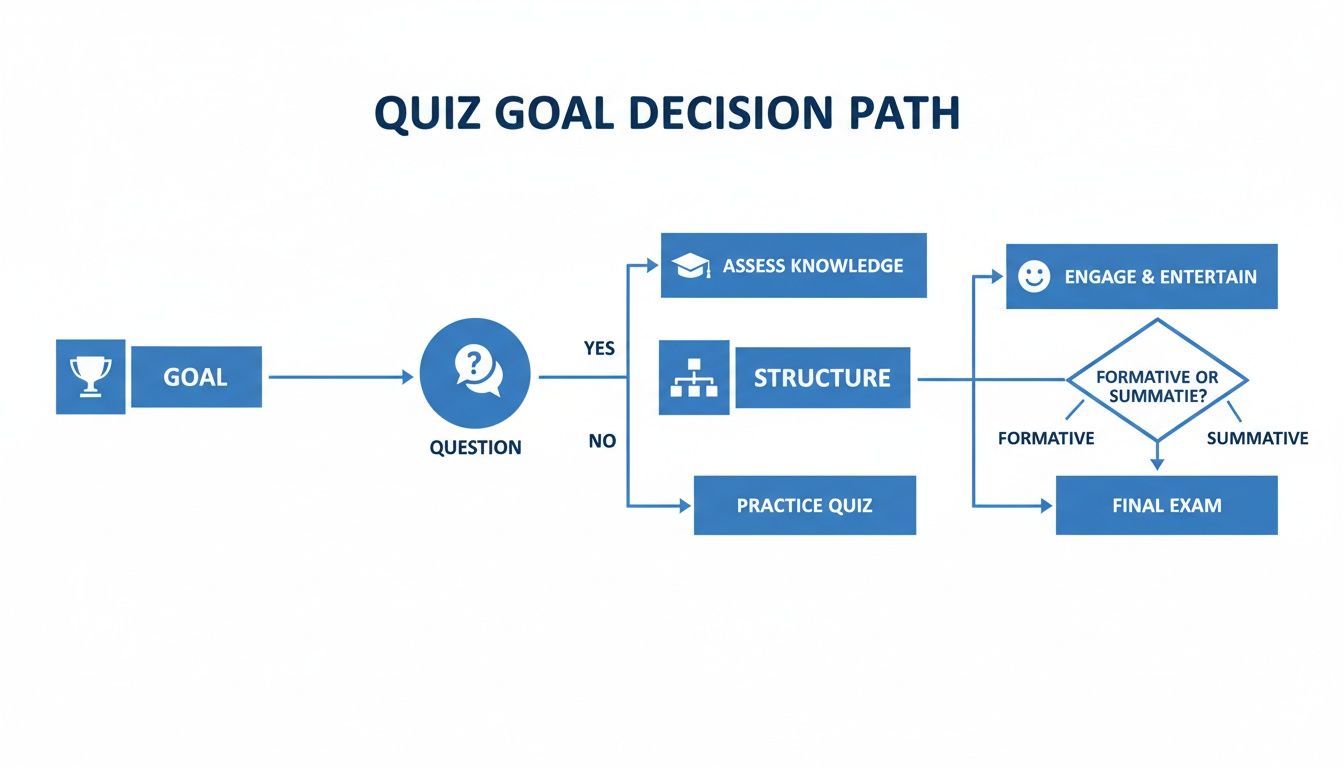
It’s clear from this flow that having a well-defined goal is the foundation. It helps you create a quiz that moves logically from one question to the next, building a cohesive and engaging experience.
From Simple Scoring to Real Personal Value
Logic is only half of the magic. The other half is scoring, which lets you deliver a genuinely personal and valuable result. At its core, any quiz is just a form. It could be a feedback form, a pizza ordering form, or a personality test. A flexible quiz maker like Notie can handle all of these because the underlying mechanic is the same: collecting inputs to produce an output.
In a knowledge check, you can assign points for correct answers. Easy. For a personality quiz, you might assign values that correspond to different traits. For instance, in our investor quiz, cautious answers could add points to a 'Conservative' profile, while riskier answers build up an 'Aggressive' one.
The real power isn't just in tallying up a score; it's in what you do with it. A custom results page is your golden opportunity to deliver that "aha!" moment of genuine insight that makes the user feel truly seen and understood.
Instead of a boring "Thanks for taking the quiz!" page, you can create custom outcome pages that speak directly to their results. The 'Conservative' investor gets a page with tips on stable investments. The 'Aggressive' investor sees content about emerging market opportunities. It’s this level of personalisation that turns a casual visitor into a warm lead or a delighted customer.
To see the difference in action, let's compare the two approaches side-by-side.
Quiz Feature Comparison Basic vs Advanced Logic
| Feature | Basic Quiz (Standard Form) | Advanced Quiz (with Notie Logic) |
|---|---|---|
| User Experience | Linear and generic. Everyone sees the same questions in the same order, which can feel impersonal. | Dynamic and conversational. Questions adapt based on previous answers, making it feel like a one-on-one chat. |
| Relevance | Some questions may feel irrelevant to the user, increasing the chance they'll drop off. | Every question is highly relevant because the path is tailored, keeping users engaged to the very end. |
| Data Quality | Collects surface-level data. You know what they answered, but not why or the context behind it. | Gathers deep, nuanced insights. You can segment users based on their unique journey through the quiz. |
| Final Outcome | A single, generic "Thank You" page or a simple score with little context. | A highly personalised results page that offers genuine value, specific advice, or targeted recommendations. |
| Lead Generation | Can feel like a transparent sales tool, potentially putting users off. | Generates highly qualified leads by providing real value first, making the user want to hear from you. |
As you can see, a little bit of logic goes a long way. It’s the key to transforming a simple form into a powerful tool for engagement and connection.
Alright, you've done the hard work and built a brilliant quiz. Now for the fun part: getting it in front of people. A great quiz deserves a great audience, so let's make sure your masterpiece doesn't just sit there gathering digital dust.
The first thing to sort out is where your quiz is going to live online. Are you embedding it right onto a page on your site, or will it get its own dedicated landing page? If you have a popular blog post, dropping the quiz right in there is a slick move to engage the traffic you already have. On the other hand, if you're planning to run paid ads or a big social media campaign, a standalone landing page is the way to go. It keeps things focused and free of distractions.
It's easy to overthink it, but at the end of the day, a quiz is really just a souped-up form. Whether you're asking for pizza toppings or someone's marketing personality, the mechanics are the same. That's why tools like Notie are built as flexible one-page form builders—they’re perfect for this kind of interactive content.
Getting the Word Out
With your quiz polished and ready, it's time to make some noise. Don't just post it once and hope for the best. The real magic happens when you push it out across a few different channels where your audience is already hanging out.
Here are a few of my go-to channels that consistently get results:
- Your Email List: These people already know and trust you. A simple, punchy subject line like "What's your marketing superpower? Take our new 2-min quiz!" is often all it takes to get fantastic click-through rates.
- Social Media Stories: Quizzes and stories are a match made in heaven. The interactive features on Instagram or Facebook are perfect for this. Tease the quiz with a few poll stickers or questions first to build a bit of hype before you drop the final link.
- Niche Online Communities: Think Reddit, specific Facebook Groups, or even professional channels on LinkedIn. Just tread carefully here. Read the group rules first and make sure you're contributing, not just link-dumping. Nobody likes a spammer.
A Quick Word on Privacy
Before you hit the big green "launch" button, let's talk about the serious stuff for a second: data and privacy. How you handle people's information is a massive trust signal, so get it right from the start. Any decent quiz maker will give you granular control over this.
You need to decide: are the submissions anonymous, or are you collecting details like names and emails? A common tactic is to ask for an email address to reveal the results—a classic for a reason, as it's great for lead generation. If you go this route, just be upfront about it. A simple "Enter your email to see your personalised results!" is honest and effective. It shows you respect their privacy and helps ensure the leads you get are from people who are genuinely interested.
Making Sense of Your Quiz Data (and Turning it into Gold)
So, you’ve launched your masterpiece of a quiz, and the responses are pouring in. Awesome! But let's be honest, getting clicks is only half the battle. The real magic happens when you dive into the data and figure out what it all means.
That analytics dashboard? It's not just a collection of numbers; it's a goldmine of insights just waiting to be unearthed. This is where your quiz transforms from a fun piece of content into a serious business intelligence tool.

A top-notch quiz maker gives you a clean, simple dashboard to track what matters. You don't need to get lost in a sea of spreadsheets. You just need a few powerful numbers that tell you the story of what your audience is thinking and doing.
First Things First: Your Core Metrics
When you pop open your analytics for the first time, don’t get overwhelmed. Zoom in on a few key metrics that give you a bird's-eye view of your quiz's performance. These are the clues that unlock everything else.
Here’s your starting checklist:
- Completion Rate: This is the big one. What percentage of people who start your quiz actually stick around to the end? A high rate is a great sign that you've nailed the engagement factor.
- Answer Distribution: What are the most popular answers? This is a fantastic way to spot trends, needs, and preferences within your audience.
- Drop-off Points: Where are people giving up and leaving? If you see a mass exodus on question five, you’ve just pinpointed a problem that needs fixing.
These numbers are your diagnostic tools. A sudden plunge in the completion rate on a specific question might mean the wording is confusing, or maybe there's a pesky technical glitch. Catching these patterns early means you can tweak the quiz and make it even better for the next person who takes it.
The real aim here isn't just to gather data; it's to connect the dots. Think of your quiz as a conversation. The analytics are your way of understanding what your audience is really telling you between the lines.
Turning Numbers into Smart Moves
Okay, let's get practical. How do you turn these numbers into actual, strategic decisions?
Imagine you run a "What's Your Biggest Business Challenge?" quiz. You check the results and discover that a whopping 70% of people are selecting "Finding New Customers." That’s not just a statistic; it's a giant, flashing neon sign pointing you toward your next blog post, webinar, or even a new product feature.
Just think about the possibilities:
- Shape Your Product: Did the quiz uncover a common pain point you hadn't thought of? Boom. That's a direct suggestion for your product roadmap.
- Sharpen Your Marketing: You can segment your audience based on their quiz results. This lets you send hyper-targeted emails that feel personal and directly address their needs.
- Fuel Your Content Engine: The questions people get stuck on or the results they get most often are a fantastic source of inspiration for your next batch of content.
This approach—letting real customer feedback guide your next steps—is the foundation of smart business planning. It's a key principle we talk about in our guide on the lean business model canvas. The insights from a simple quiz can feed right into this strategic process, delivering a seriously powerful return on your effort.
Got Questions About Making Quizzes? We've Got Answers.
Still got a few questions buzzing around in your head? Good. That means you’re on the right track. When you’re building something new, a little curiosity is the best sign there is. We’ve pulled together some of the most common things people ask to clear things up and get you building with total confidence.
You've seen what a great quiz maker can do, but let's get into the nitty-gritty.
Can I Use a Quiz Maker for... You Know, Not Quizzes?
Oh, absolutely! This is probably the biggest myth we see. When you strip it all down, a powerful quiz maker is really just a super-flexible, one-page form builder. The core function—asking questions to get information—is the same whether you're asking someone their favourite colour or their budget for a new project.
Think of it this way: a "Which Superhero Are You?" quiz uses the exact same logic as a "Build Your Perfect Pizza" ordering form. Both walk a user through a set of choices to get to a personalised result.
You can easily adapt that same interactive flow to build:
- Customer feedback forms that are actually fun to fill out.
- Product research surveys that people don't abandon halfway through.
- Onboarding checklists to guide new users step-by-step.
It's all about versatility. The interactive format just makes the whole "giving you information" process feel a lot less like a chore and more like a conversation.
How Do I Stop People From Bailing on My Quiz Halfway Through?
Ah, the million-dollar question! Keeping people hooked right to the finish line is an art, but it comes down to making the experience feel rewarding and dead simple. Kick things off with a title that makes someone need to know the answer and an opening question that’s a breeze to answer.
Variety is your secret weapon here. Mix up your question types. Throw in some multiple-choice, a few image-based questions, and maybe even a GIF to break things up and keep the energy high.
Try to keep it snappy. We’ve found that 8-15 questions is the magic number to get the data you need without your audience getting bored. Most importantly, always dangle a juicy, personalised result at the end. That feeling of "I can't wait to see my results" is what will drag them over the finish line.
Remember, the best quizzes are a conversation, not an interrogation. You get the insights you need, and your audience gets a moment of fun or a genuinely helpful piece of information. Everybody wins.
What’s the Smartest Way to Connect My Quiz to My Other Marketing Stuff?
This is where the real magic happens. You’ll want a quiz maker that talks to the tools you’re already using, like your CRM or email marketing platform. It's these seamless integrations that turn your quiz from a one-off piece of content into a lead-generating machine that practically runs itself. Checking out the different plans available is a great way to see what’s possible; you can usually find these details on a pricing and features page.
For instance, you could automatically pipe new leads straight into your email list and tag them based on their quiz results. Someone who gets a "Beginner" result could be dropped into an introductory email series, while an "Expert" gets a completely different follow-up with more advanced content. It’s this kind of automation that makes your marketing feel personal and ridiculously effective.
Ready to build a quiz that actually gets results? With Notie, you can turn your ideas into interactive forms, quizzes, and documents in minutes, not hours. Start creating for free today.