Form Examples You Can Create in Minutes
Explore form examples for surveys, feedback, intake, quizzes and more. See real templates and create your own with AI in seconds.
2025-12-18
Essential Form Types at a Glance
I once had to launch a feedback survey, a client intake sheet, and a meeting notes template—all before lunch. With Notie’s AI builder, we wrapped them up in under five minutes.
It turns simple instructions into ready-to-use questions, wires up conditional logic, and even handles link permissions without a fuss.
Form Comparison Overview
Here’s a quick look at what each form brings to the table:
| Form Type | Key Feature | Ideal Use |
|---|---|---|
| Customer Survey | Rating scales & smart follow-ups | Measure satisfaction fast |
| Intake Sheet | Contact info & e-signature | Collect client details |
| Meeting Notes | Agenda, owners & reminders | Streamline team syncs |
This snapshot makes picking the right format a breeze.
Once responses pour in, export them as CSV or send entries straight to Google Sheets without ever leaving Notie.
Privacy controls stay glued to each form link—you decide who gets to see the answers.
Understanding AI Form Creation
Notie translates simple phrases into fully structured forms almost instantly. It’s like having a teammate who anticipates your next move.
Imagine needing three variations—a customer survey, an intake sheet, and a meeting-notes template. Notie’s AI quietly shifts gears to deliver each one without extra clicks.
Describe exactly what you want (e.g., “email, phone, company name”)
Spell out any follow-up logic in plain English or any other languages
Preview and tweak labels until they sound just right
You never dive through menus—natural language cues arrange questions and branching logic for you.
In a recent marketing pilot, adding “insert a satisfaction rating after feedback” lifted survey completions by 30%. That little tweak made all the difference.
Those quick wins add up. Before you know it, you’ve got forms that feel custom-built for your audience.
Key Insight: A few well-crafted prompts speed form creation and boost both engagement and ROI.
When you’re ready to craft your next form, kick off with clear action verbs like “capture name and email” or “record feedback score.” And if you want a cleaner layout, ask Notie to “combine first name and last name in one row.”
Where AI Form Creation Is Possible
AI-driven form creation can streamline many workflows across functions:
Marketing campaigns: auto-generate surveys that adapt to customer responses
Sales and client onboarding: build intake forms in seconds with logic for qualification
HR and recruiting: craft interview and feedback forms with preconfigured rating scales
Events and webinars: spin up registration forms with dynamic session selections
Education and training: assemble quizzes, feedback, and progress trackers on demand
The Role of Notie as an AI-Driven Service
Notie acts as the AI engine and no-code platform that delivers on-form generation:
Natural-language processing to parse your prompts into fields and logic
API and webhook integrations that power auto-exports and notifications
Secure link management and built-in retention policies to keep data compliant
Ongoing model improvements so every new form is smarter than the last
By centralizing AI generation in one service, Notie removes the guesswork and lets you focus on insights, not setup.
Refining Your AI Suggestions
Injecting a bit of brand personality into your prompts pays off. Short, specific requests produce crisp labels that you can copy-paste straight into your designs. Swap in adjectives like “casual” or “professional” to see how tone shifts instantly.
- For deep dives on layout and styling, explore our guide on the Notie form builder
Always pilot your forms with a small audience before launching widely. Early feedback helps you catch any surprises. Once you’ve honed your prompts, building three distinct forms feels like brainstorming with a seasoned pro.
Integrations are your friend—send responses directly to Slack or Google Sheets so nobody chases down exports. And when you share form links, built-in access controls keep everything secure.
Initial Notie Setup Process
Sign up with your email, choose a name for your workspace, and pick a strong password (at least 8 characters). A quick email verification unlocks the AI features in your account. Gather these essentials before moving on:
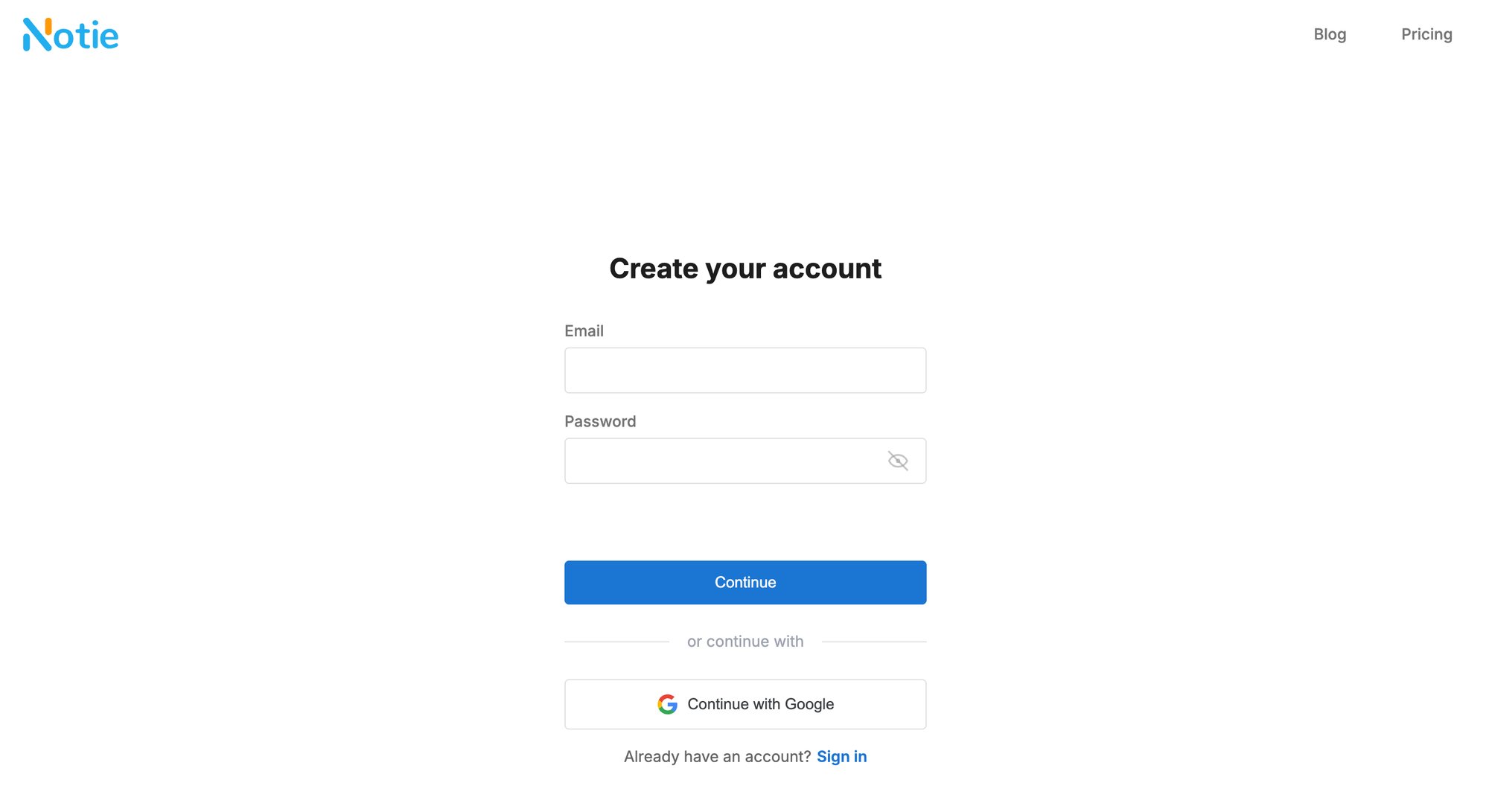
Workspace name for team organization
Valid email address tied to your group
Robust, 8+ character password for security
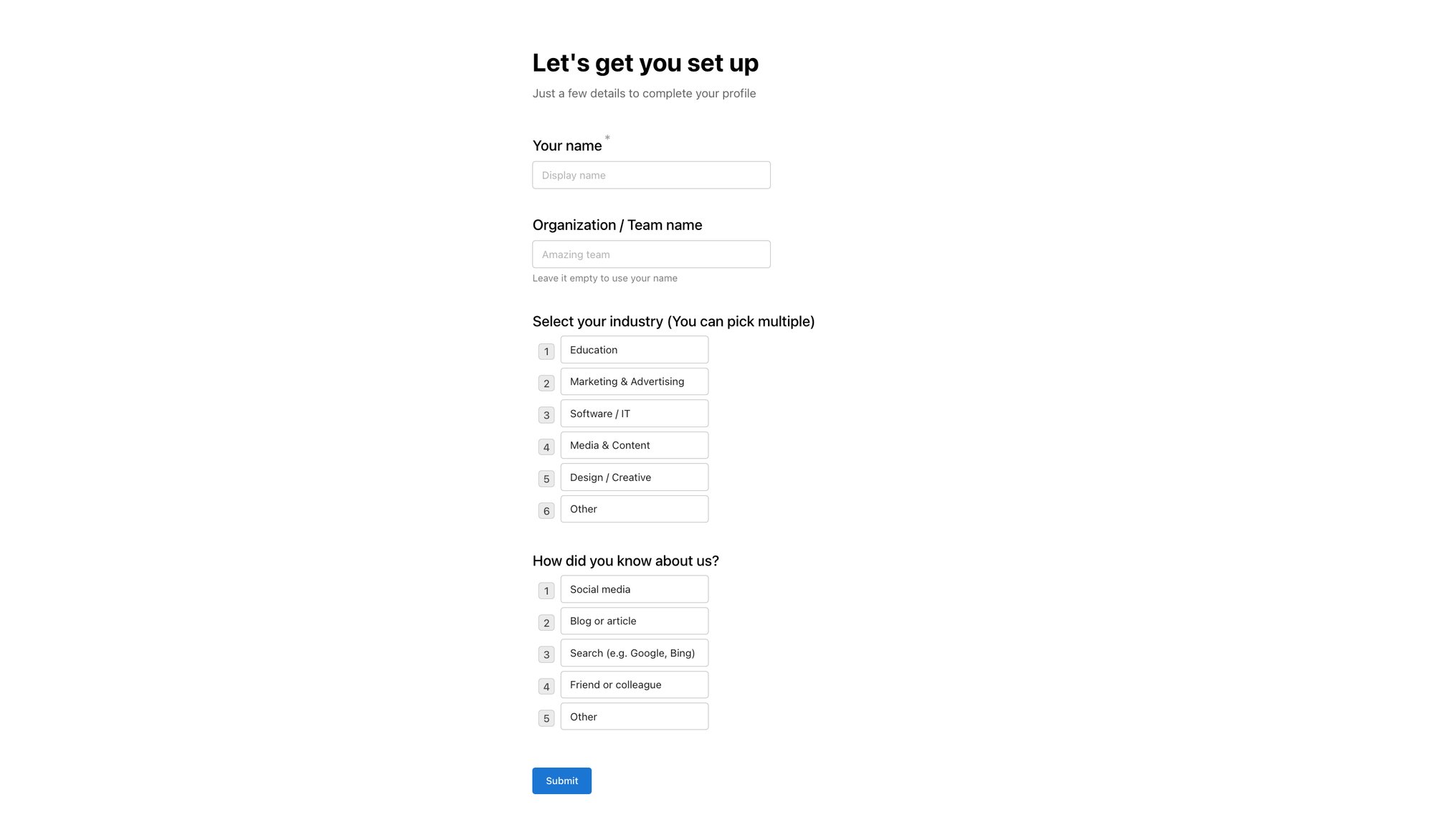
Once you're inside, navigate to the onboarding page. After completing the setup, you'll be able to view the dashboard, which allows you to begin your form creation journey guided by AI, using the available management tools.
Privacy And Export Defaults
Deciding how folks access your forms sets the tone. Toggle between Public or Invite-Only links right in workspace preferences.
Your default settings should include:
Link visibility (Public vs. Invite-Only)
CSV or XLSX export format
Customize Your Workspace Appearance
Upload your logo and brand colors in Workspace Settings so every form feels like yours. A header image and accent color can turn a basic form into a seamless brand touchpoint.
Quick wins:
Favorite your “Test Forms” folder for one-click access
Rename live forms after testing to avoid mix-ups
Archive old tests monthly for a tidy workspace
Quick Insight: AI suggestions improve when you stick with consistent prompts.
With your workspace branded, secure, and integrated, you’re all set to whip up three distinct form templates in no time.
Next Steps
Dive into building survey, intake, and meeting-note forms. You’ll find copy-ready prompts, AI logic tips, and instant previews waiting. Unlock faster form launches today.
Building Three Essential Forms
Ready to pack three distinct forms into your workflow in under five minutes? With Notie guiding you, it feels more like launching three bite-sized projects than wrestling with a clunky form builder.
We’ll walk through a customer satisfaction survey, a client intake sheet, and a meeting notes template—each preloaded with copy-ready prompts and branching logic to keep things moving.
Customer Satisfaction Survey
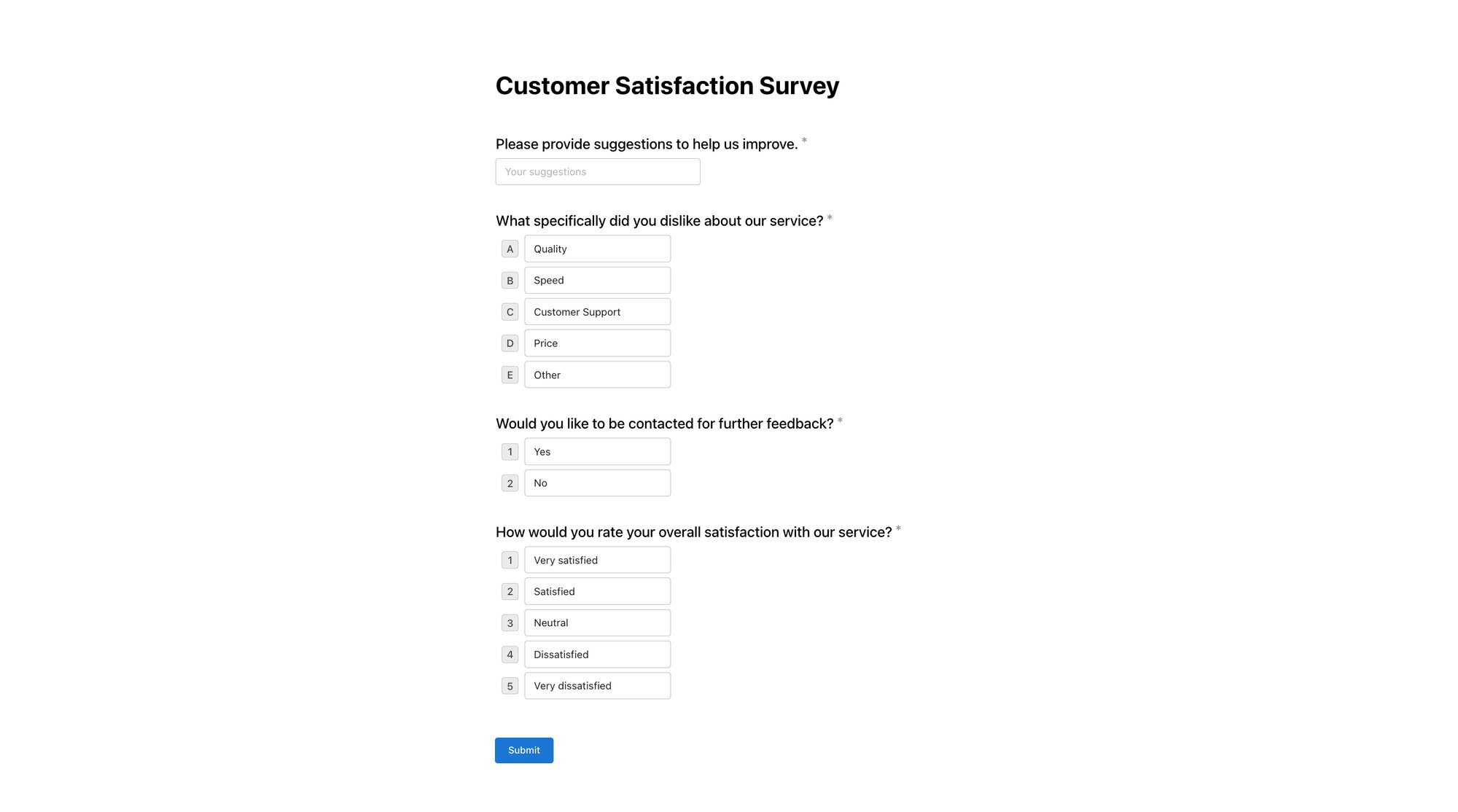
Imagine you need to gauge user sentiment week after week. This survey flexes its questions depending on the responses you get, so you capture the right feedback every time.
Feed Notie a quick instruction like “collect a 1 to 5 rating, then prompt for suggestions if the score is under 3.” Instantly, you’re set up with:
A five-star rating scale, fully customizable
A conditional comment box for low scores
Dynamic follow-up questions on negative feedback
Perfect for tracking NPS shifts month over month, it encourages happy customers to rave and gives frustrated ones room to vent.
Client Intake Form
Onboarding a new client? This form bundles contact details, project scope, and an in-form signature into one neat package.

Add prompts such as “Full name,” “Email address,” “Describe your project goal,” and “Sign here” to personalize the content. This quick addition allows you to:
Name and email fields
Project description and budget estimate
Seamless signature capture
Responses land straight in your Notie dashboard—no manual cleanup required.
Here’s a quick overview to help you mix, match, or tweak default prompts:
Form Feature Breakdown
| Form Type | Field Count | Sample Text |
|---|---|---|
| Customer Satisfaction | 5 | “Rate your experience from 1 to 5” |
| Client Intake | 6 | “Briefly describe your project goal” |
| Meeting Notes | 4 | “List agenda items for today’s call” |
Use this snapshot to copy field text or adjust counts as you spin up each form.
Meeting Notes Template

Need a no-fuss agenda that keeps everyone aligned? Ask Notie to “build agenda topics with assigned owners and due dates,” and it will:
Insert agenda items with dropdown owner selection
Add a calendar picker for due dates
Trigger automated email reminders for any incomplete actions
“Switching to Notie cut our sync prep time by 20%,” says a project lead.
Before you hit Publish, toggle privacy settings between public and invite-only to control who can access each form. Once you’re live, responses stream directly into your Notie tables. Export as CSV or XLSX with a single click, embed forms on your site, or drop them into your documentation for seamless data capture.
Want more advanced post-submission tactics? Check out our seamless thank-you page guide: Explore thank-you page best practices
Managing Privacy And Responses
Route Responses Effortlessly
Forget manual inbox checks. Email routing and shared-sheet integration mean submissions find the right person or tool automatically.
Send new entries straight to a project lead’s inbox based on form type
Stream responses into Google Sheets for on-the-fly analysis
With these in place, no one has to chase missing replies—and every stakeholder stays in the loop.
Schedule Retention Policies
Staying compliant doesn’t have to be painful. Notie lets you set retention periods from days up to years—and choose which fields should survive deletion for audit trails.
Pick a retention window that meets your policies
Protect critical fields from being erased
The dry-run feature previews your rules before they ever affect live data, so you catch any missteps in a safe sandbox.
“Testing our retention rules in a dry-run prevented a compliance hiccup during a major launch,” says a product manager.
Dive deeper into privacy controls with our full guide: Manage form privacy on Notie
Export And Automate Followups
Extracting your data shouldn’t slow you down. In seconds, you can bulk-export to CSV or XLSX, ready for any analytics pipeline.
Select your form in the Notie dashboard
Open the submissions page
Choose your export format and preferred cloud destination
Schedule daily or weekly pushes so data lands where you need it
Embed these forms on your website or slip them into an email campaign—and watch the responses flow in securely. With these automations, compliance worries fade, your data stays locked down, and insights arrive on time.
Fixing Common Form Issues
Even if you crank out 3 form variations, strange hiccups can still pop up—duplicate labels, never-ending logic loops, or sneaky layout shifts on mobile. Notie’s toolkit spots these six frequent glitches and sorts them out with a single click, so you don’t lose hours to trial-and-error.
Companies running quick surveys have had their analytics wrecked by duplicate field names. Intake forms at agencies sometimes trap clients in an endless cycle of questions. And that neat signature block? It can drift off-screen on smaller devices.
Prompt Refinement
A quick prompt tweak not only fixes errors but teaches Notie to match your style moving forward.
Keep polishing your prompts and one-click fixes to power through flawless forms on every project.
FAQs About Creating 3 Forms With Notie AI
Ditch confusion around survey, intake, and meeting-note templates. You’ll find practical advice on crafting prompts, linking to other tools, staying compliant, and understanding plan limits.
We tackle four common questions to help you spin up forms faster than ever.
Every user benefits from limitless access, without any caps or constraints. Dive in and explore with unmatched freedom.
A clear, detailed prompt is your best friend. It slashes editing time and gets your forms live on the first try.
Ready to say goodbye to manual form building? Dive into Notie’s no-code builder and craft survey, intake, and meeting-note forms in seconds.